

LinkPay Integration Step
Follow this chapter to complete payment integration via our Hostpage product LinkPay API.
🌐 Language Switch / 语言切换
The following steps and field descriptions are designed to help you clearly understand the entire payment process and ensure a smooth integration.
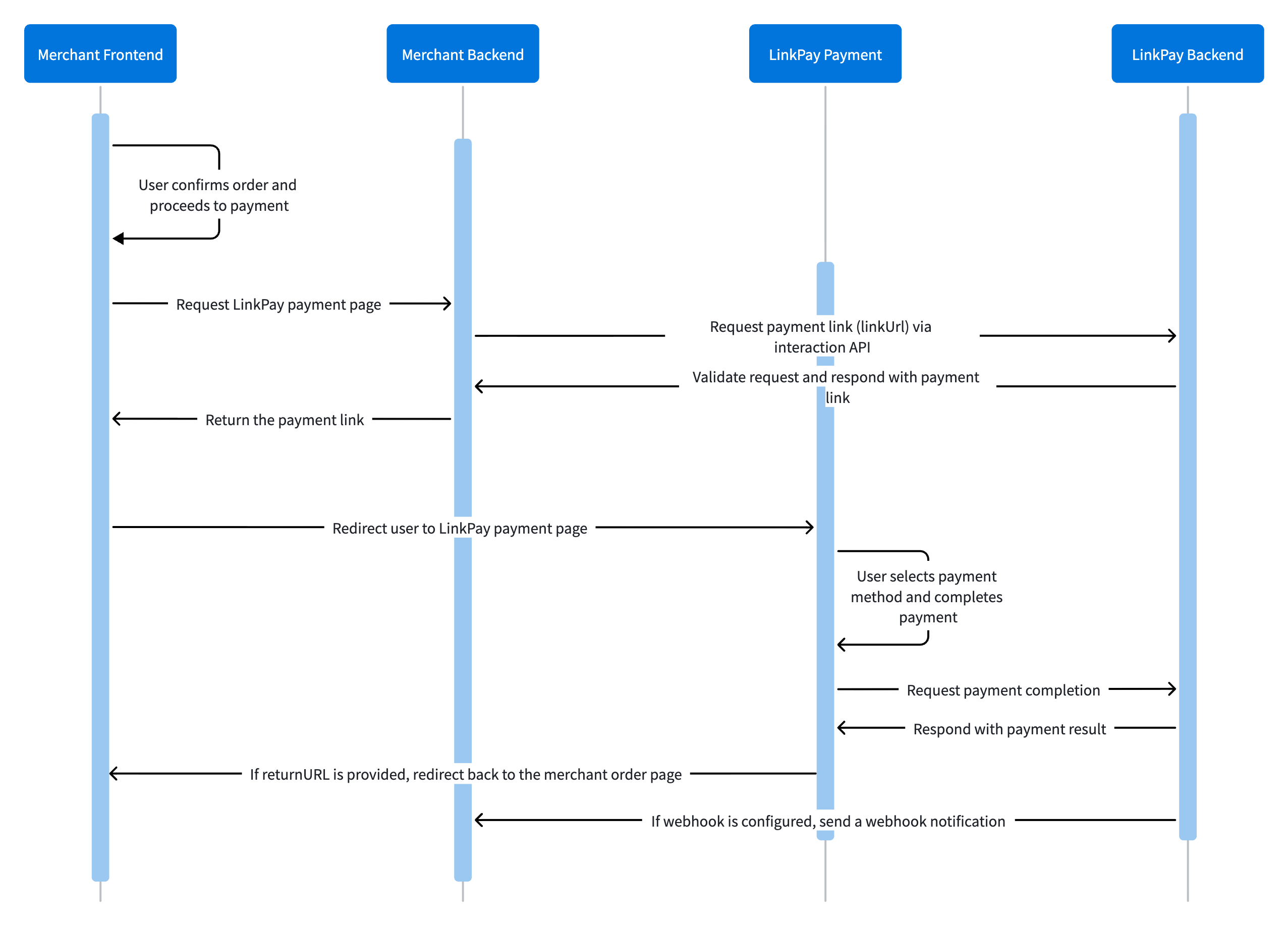
1. Get a Payment Link
Follow the steps below to build your API request and obtain a payment link (LinkUrl).
All API interfaces adopts a KeyIDand Key-based authentication mechanism to validate the legitimacy of requests. No additional signing or encryption/decryption operations are required.
Once you receive the payment link, you can redirect the user to the LinkPay Payment Page. On the LinkPay Payment Page, the user can select a payment method and complete the payment.
For more parameter details, please refer to the POST interaction API.
2. Receive the Payment Result
Via Webhook
If you include a webhook URL in the POST interaction request, you will receive a payment result notification via Webhook when the payment succeeds.
For parameters, see the API Explorer: interaction Notification
NoteUpon receiving a notification, you must return the plain text
SUCCESSto acknowledge receipt. If Evonet does not receive this response, the system will retry sending the notification according to a fixed schedule (intervals: 15/15/30/180/1800/1800/1800/1800/3600 seconds) until it receivesSUCCESSor the maximum number of attempts is reached.
Via returnURL
If you include a returnURL in the POST interaction request, Evonet will append the payment result to the returnURL and redirect the user back to the merchant site once the payment succeeds.
ExampleIf your
returnURLis:https://www.merchant.comAfter the payment is completed successfully, Evonet will redirect the user to:
https://www.merchant.com?merchantOrderID=123123123123&result=success
3. Retrieve the Payment Result
Follow the steps below to retrieve the payment result of a LinkPay order you created.
Use GET and append merchantOrderID to the request URL to obtain the payment result.
"result.code": "S0000"
"merchantOrderInfo.status": "Paid"
"transactionInfo.status": "captured"
For more parameter details, see the GET interaction API.
Use POST /payment/{merchantTransID}/refund to initiate a full or partial refund for an order that has already been successfully paid.
merchantTransIDmust be obtained fromtransactionInfo.merchantTransInfo.merchantTransIDin the retrieval response or in an asynchronous notification.
Use GET /payment/{merchantTransID} to query the refund status.
5. Using LinkPay for subscriptions
LinkPay can be used to set up subscription scenario, the integration flow is about the same as above, only few minor adjustments as below:
First Time Subscription:
- When creating a LinkPay payment link, use the following parameters:
User action required: On the LinkPay payment page, the user must check "I have read and agree to 《Terms and Conditions》" so that the system can generate a
{ "userInfo": { "reference": "your_user_reference" }, "paymentMethod": { "recurringProcessingModel": "Subscription" } }tokenafter payment completion for future recurring transactions. - Save the Token
- After payment is completed, store the
tokenfrom either webhook or payment response API. - Store the
token.valuein your system and bind it withuserInfo.reference.
- After payment is completed, store the
Subsequent subscription (MIT Transaction)
- Use the Payment API to initiate the transaction.
- The request parameters must include (see the Appendix Payment API interface for details):
{ "paymentMethod": { "token": { "value": "Previously saved token value" }, "recurringProcessingModel": "Subscription" } } - Order Tracking:Use
merchantTransIDto track the order ID of the subsequent payments. (GET Payment) - Capture transactions:
captureAfterHoursshould be set to 0 for immediate capture- If this field is not provided, the merchant must later call the
POST /captureAPI to perform manual capture.
一、获取支付链接
按照以下步骤构建 API 请求,并获取支付链接(LinkUrl)。
所有接口采用 KeyID、Key的方式进行鉴权,用于校验请求合法性,无需额外进行签名的加解密操作。
当你收到支付链接后,可以将用户重定向至 LinkPay 支付页面。用户可在 LinkPay 支付页面中选择支付方式并完成支付。
更多参数详细信息,请参见 POST interaction API 接口详细信息。
二、接收支付结果
通过 Webhook 接收支付结果
如果你在 POST interaction 请求中传入了 webhook 地址,当支付成功时,你将会通过 Webhook 接收到支付结果通知。
参数请参考 API Explorer interaction Notification。
Note收到通知后,需返回纯文本 SUCCESS 表示接收成功。若未收到响应信息,系统会按照规定的频率(15/15/30/180/1800/1800/1800/1800/3600. 单位:秒)定期重新发送异步通知,直到成功收到 SUCCESS 或通知次数达到上限。
通过 returnURL 接收支付结果
如果你在 POST interaction 请求中传入了 returnURL,当支付成功时,Evonet 会将支付结果附加到 returnURL 并跳转回商户网站。
Example如果你的 returnURL 是:
https://www.merchant.com当支付成功完成后,Evonet 会重定向用户至:
https://www.merchant.com?merchantOrderID=123123123123&result=success
三、查询支付结果
按照以下步骤查询已创建的 LinkPay 订单支付结果。
使用 GET 方法,通过在请求 URL 中附加 merchantOrderID 来获取该 LinkPay 订单的支付结果。
判断支付是否成功的方法: 在 查询支付结果 接口或异步通知中,检查以下字段:
"result.code": "S0000"
"merchantOrderInfo.status": "Paid"
"transactionInfo.status": "captured"
更多参数详细信息,请参见 GET interaction API 接口详细信息。
通过 POST /payment/{merchantTransID}/refund 接口对已经完成支付的订单发起全额或者部分退款。
merchantTransID需从查询响应或异步通知中的transactionInfo.merchantTransInfo.merchantTransID中获取。
通过 GET /payment/{merchantTransID} 接口查询退款状态。
五、使用 LinkPay 实现订阅场景
通过 LinkPay 可实现订阅支付场景,整体流程同上面的描述,仅需在对应步骤进行如下调整即可:
首次订阅
- 在创建 LinkPay 支付链接时,需设置以下特殊参数:
用户操作要求:在 LinkPay 支付页面中,用户需勾选 "I have read and agree to 《Terms and Conditions》",以便系统在支付完成后生成用于后续交易的
{ "userInfo": { "reference": "your_user_reference" }, "paymentMethod": { "recurringProcessingModel": "Subscription" } }token。 - 获取并保存 Token:
- 支付完成后,从 webhook 回调通知或查询接口中获取
token。 - 将
token.value保存到后端数据库,并与userInfo.reference进行关联。
- 支付完成后,从 webhook 回调通知或查询接口中获取
后续订阅 (MIT 交易)
- 调用 Payment API 直接发起交易。
- 请求参数中需包含(详见附录 Payment API 接口):
{ "paymentMethod": { "token": { "value": "之前保存的token值" }, "recurringProcessingModel": "Subscription" } } - 订单跟踪:使用
merchantTransID跟踪后续订阅订单。(GET Payment) - 资金捕获:
- 通过
captureAfterHours字段设置自动捕获延迟小时数(例如"0"表示立即捕获),字符串格式。 - 若未上送此字段,则需后续调用
POST /capture接口进行手动捕获。
- 通过
Updated 2 months ago