

Direct API Integration Step
This guide is intended for developers, detailing how to integrate online payment functionality via the Direct API. It supports Payment, Retrieve, Capture, Refund, Cancel, and Recurring scenarios.
🌐 Language Switch / 语言切换
The following steps and field descriptions are designed to help you clearly understand the entire payment process and ensure a smooth integration.
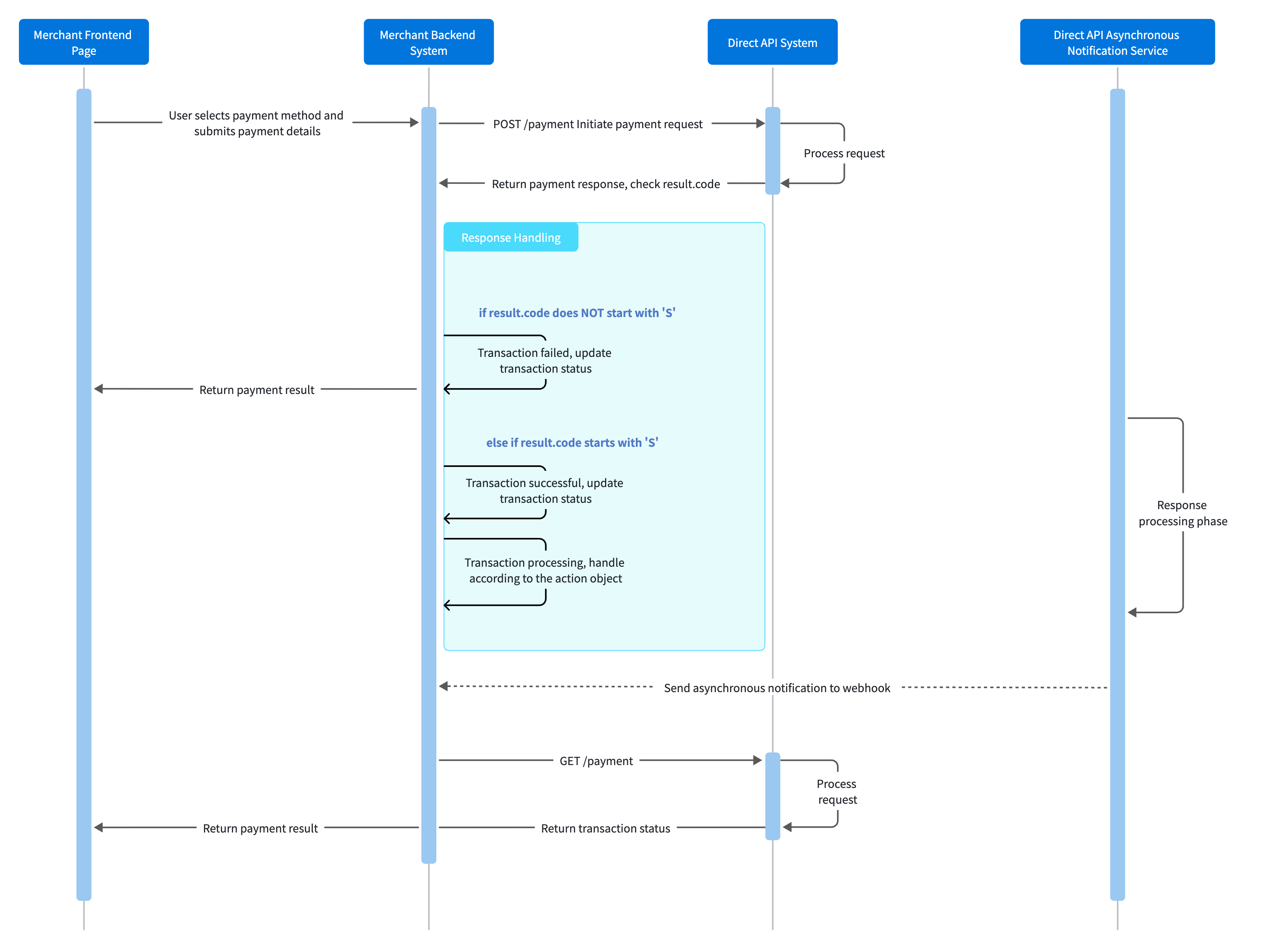
1. Display Payment Methods
On the checkout page, display the available payment methods. After the user selects a payment method and enters the required information (e.g., card number, expiry date), submit the data to your backend.
2. Initiate a Payment Request
Your backend should submit a payment request via the POST /payment interface. The request must include the KeyID, secret Key, and an Idempotency Key.
All API interfaces adopts a KeyIDand Key-based authentication mechanism to validate the legitimacy of requests. No additional signing or encryption/decryption operations are required.
Request Example:
curl --location --request POST 'https://sandbox.evonetonline.com/payment' \
--header 'Authorization: sk_sandbox_3bf8181129cb4c9aa3d62cd113b6518a' \
--header 'DateTime: 2025-07-09T11:18:00+08:00' \
--header 'KeyID: kid_55209b3968f748609dbe3a9dde87fdd3' \
--header 'SignType: Key-based' \
--header 'Content-type: application/json' \
--header 'Idempotency-Key: order_202507091032_001' \
--data '{
    "merchantTransInfo": {
        "merchantTransID": "pay_250709135509000153215434",
        "merchantTransTime": "2025-07-09T11:18:00+08:00"
    },
    "transAmount": {
        "currency": "HKD",
        "value": "100"
    },
    "paymentMethod": {
        "type": "card",
        "card": {
            "cardInfo": {
                "cardNumber": "4761360072118507",
                "expiryDate": "0529",
                "holderName": "Paulette Homenick"
            }
        }
    },
    "captureAfterHours": "0",
    "allowAuthentication": true,
    "returnURL":"https://www.evonetglobal.com",
    "webhook": "https://webhook.merchant.com"
}
Key Fields:
| Field Name | Type | Description | Notes |
|---|---|---|---|
| merchantTransInfo.merchantTransID | string | Unique merchant transaction ID | Used for query, refund, and other operations |
| paymentMethod.type | string | Payment method type (e.g., card, e-wallet) | Must match the corresponding structure. See example below |
| captureAfterHours | string | Hours to delay automatic capture | "0" means capture immediately |
| allowAuthentication | boolean | Whether to enable 3DS authentication | Recommended: true |
| returnURL | string | URL to redirect to after payment completion | Required if "allowAuthentication": true is sent |
| webhook | string | Asynchronous notification URL | For receiving payment results |
paymentMethod.type Example (e-wallet): Different type values have different structures. Please refer to the paymentMethod.type Values for specific parameters.
    "paymentMethod": {
        "type": "e-wallet",
        "e-wallet": {
            "paymentBrand": "Merpay"
        }
    }
Note: Handling TimeoutsThe API supports idempotency. If a request times out, retry with the same payload and
Idempotency-Keyto ensure a consistent response and avoid creating duplicate transactions.
3. Handle the Payment Response
Handle subsequent steps based on the action object in the response. Determine the transaction result using result.code and payment.status:
-
result.codestart with 'S' (e.g., S0000): Checkpayment.status.- Success states:
authorized、captured、verified、identified - Processing states:
verify_pending、auth_pending、identify_pending- Handle according to
action.type(e.g., redirect user tothreeDSData.url).
- Handle according to
- Success states:
-
result.codedoes not start with 'S': Transaction failed. Checkresult.message.
Response Example:
{
    "action": {
        "threeDSData": {
            "method": "GET",
            "url": "https://counter-uat.everonet.com/3ds?dGhyZWVEU1BzcD1ISVRSVVNUJmluc0NvZGU9OTA0NTE5MDAmb3JkZXJOdW09cGF5XzI1MDcxMDE2MDczMDAwMDEwMDAwMDQzODg1NDEmc3RvcmVOdW09UzAwNTIyOCZ0aHJlZWRzSW50ZWdyYXRvck9pZD0xMzY4MjE5MCZ0aHJlZURTQXV0aFVSTD1hSFIwY0hNNkx5OXphWFF0TTJSemN5MWpjSGg1TG1ocGRISjFjM1J3WVhrdVkyOXRMblIzTDNSb2NtVmxaSE10YVc1MFpXZHlZWFJ2Y2k5aGRYUm9Mekl1TVM0d0wyOTJWRlJaWTJ0V1NGbGtjbVp1ZFRKUFVVNWthamxKU1V4S1VXVnNXbVJqYUU1dlowODRPRlZxUTBrPSZyZXR1cm5Vcmw9YUhSMGNITTZMeTkzZDNjdVkyRnlaR2x1Wm05c2FXNXJMbU52YlE9PQ=="
        },
        "type": "threeDSRedirect"
    },
    "authentication": {
        "liabilityShift": false,
        "type": "threeDSPage"
    },
    "payment": {
        "evoTransInfo": {
            "evoTransID": "pay_250709135509000153215434",
            "evoTransTime": "2025-07-10T08:07:30Z",
            "retrievalReferenceNum": "519116015325",
            "traceNum": "015325"
        },
        "merchantTransInfo": {
            "merchantOrderReference": "mc-250528",
            "merchantTransID": "pay_250709135509000153215434",
            "merchantTransTime": "2025-07-09T11:18:00+08:00"
        },
        "pspTransInfo": {
            "retrievalReferenceNum": "519116015325"
        },
        "status": "verify_pending",
        "transAmount": {
            "currency": "HKD",
            "value": "100.00"
        }
    },
    "paymentMethod": {
        "card": {
            "first6No": "476136",
            "fundingType": "credit",
            "holderName": "Paulette Homenick",
            "issuingCountry": "IND",
            "last4No": "8507",
            "paymentBrand": "Visa"
        },
        "isNetworkToken": false
    },
    "result": {
        "code": "S0000",
        "message": "Success"
    }
}
Key Fields:
| Field Name | Type | Description | Notes |
|---|---|---|---|
| action.type | string | Type of action required (e.g., threeDSRedirect) | Determines the next steps. See example below |
| payment.status | string | Payment status | e.g., captured means success, verify_pending requires authentication |
| result.code | string | Result code | 'S' prefix indicates success, otherwise failure |
| refund.message | string | Result description | e.g., "Success" or error message |
action.type Example (redirectUser): Different type values require specific handling flows. Relevant data (e.g., action.url) is provided in the action object. Please refer to paymentMethod & action Flow
    "action": {
        "redirectData": {
            "method": "GET",
            "url": "https://stg.openapi.mul-pay.jp/wallet/startSession?p=eyJhY2Nlc3NJZCI6IjBjYWE4M2ZmMzA0NjVhODhhOWE1NjEzZDc3NzMyMzdiIn0"
        },
        "type": "redirectUser"
    }
Note
- If
"payment.status": "authorized"and thecaptureAfterHoursfield was not sent, you must manually capture the amount by calling the Capture interface.- Implement a fallback mechanism: poll for the final status using the
GET /paymentinterface.
For more parameters, see: API Explorer Payment API.
4. Handle Asynchronous Notifications (Webhook)
Evonet will send payment result notifications via a POST request to your webhook URL. These notifications only contain finalized states, not intermediate processing states.
Notification Example:
{
    "eventCode": "Payment",
    "payment": {
        "evoTransInfo": {
            "evoTransID": "pay_2507091522550001000000860156",
            "evoTransTime": "2025-07-09T15:22:55+08:00"
        },
        "merchantTransInfo": {
            "merchantOrderReference": "mc-250709",
            "merchantTransID": "pay_2507091522550001000000860156",
            "merchantTransTime": "2025-07-09T11:18:00+08:00"
        },
        "status": "captured",
        "transAmount": {
            "currency": "HKD",
            "value": "100.00"
        }
    },
    "paymentMethod": {
        "card": {
            "first6No": "476136",
            "last4No": "8507",
            "paymentBrand": "Visa"
        }
    }
}
Required Response:
SUCCESSKey Field:
| Field Name | Type | Description | Notes |
|---|---|---|---|
| eventCode | string | Type of notification (e.g., Payment) | Check this first to determine the notification type |
| payment.status | string | Payment status | see logic below |
| capture.status | string | Capture status | capture_successed (success), capture_declined (failure) |
| refund.status | string | Refund status | refund_successed (success), refund_declined (failure) |
| cancel.status | string | Cancel status | cancel_successed (success), cancel_declined (failure) |
Processing Logic:
First, check the eventCode to determine the notification type, then check the relevant status field.
-
Payment - payment.status:
-
Card Payments (paymentMethod.type = card):
captured: Transaction successful.verified: 3DS authentication completed. Wait for acapturednotification to confirm success.authorized: Authorization completed. Wait for acapturednotification to confirm success. IfcaptureAfterHours = 0was not sent in the request, you must call the Capture interface.identified: Identity verification completed. Proceed with the payment flow based on business needs.declined: Transaction failed. CheckfailureCodeandfailureReasonto display to the user for troubleshooting.verify_declined: 3DS authentication failed.- If the original POST /payment request had
allowAuthentication = trueANDauthentication.preference = "preferred", you might receive a final status ofauthorized(wait forcaptured) ordeclinedinstead. - If the request parameters were different from the above, treat
verify_declinedas a final failure.
- If the original POST /payment request had
identify_declined: Identity verification failed. Treat this as a final failure.
-
Non-card Payments:
captured: Transaction successful.declined: Transaction failed. CheckfailureCodeandfailureReasonto display to the user for troubleshooting.
-
-
Capture - capture.status:
capture_successed: Capture successful.capture_declined: Capture failed.
-
Refund - refund.status:
refund_successed: Refund successful.refund_declined: Refund failed.
-
Cancel - cancel.status:
cancel_successed: Cancel successful.cancel_declined: Cancel failed.
NoteUpon receiving a notification, you must return the plain text
SUCCESSto acknowledge receipt. If Evonet does not receive this response, the system will retry sending the notification according to a fixed schedule (intervals: 15/15/30/180/1800/1800/1800/1800/3600 seconds) until it receivesSUCCESSor the maximum number of attempts is reached.
For more parameters: see API Explorer Payment Notification .
5. Display Payment Result
Display the payment result to the user based on the response or asynchronous notification. In case of failure, it is recommended to display the result.message or failureReason to help the user take subsequent actions.
6. Recurring
Recurring payments consist of two types of transactions: the initial (or first) recurring transaction and subsequent transactions. The first transaction must complete card binding and payment, subsequent payments use the generated token.
Initial Payment (Save Credentials)
Initiate a payment via POST /payment and set the following fields to generate a token:
{
  "userInfo": {
    "reference": "your_user_reference"
  },
  "paymentMethod": {
    "recurringProcessingModel": "Subscription"
  }
}
Request Example (Subscription):
{
    "merchantTransInfo": {
        "merchantTransTime": "2025-05-28T09:55:57Z"
    },
    "transAmount": {
        "currency": "HKD",
        "value": "100"
    },
    "paymentMethod": {
        "type": "card",
        "card": {
            "cardInfo": {
                "cardNumber": "4895330111111119",
                "expiryDate": "1231"
            }
        },
        "recurringProcessingModel": "Subscription"
    },
    "userInfo": {
        "reference": "your_user_reference"
    },
    "captureAfterHours": "0",
    "allowAuthentication": true,
    "returnURL":"https://www.evonetglobal.com",
    "webhook": "https://webhook.merchant.com"
}
Response Example:
{
    "action": {
        "threeDSData": {
            "method": "GET",
            "url": "https://counter-uat.everonet.com/3ds?dGhyZWVEU1BzcD1ISVRSVVNUJmluc0NvZGU9OTA0NTE5MDAmb3JkZXJOdW09cGF5XzI2MDIwNTE2MzUxNDAwMDIwMDAwNTkwNjkzMzEmc3RvcmVOdW09UzAwNTE4OCZ0aHJlZWRzSW50ZWdyYXRvck9pZD0zMDA0MjMwOCZ0aHJlZURTQXV0aFVSTD1hSFIwY0hNNkx5OXphWFF0TTJSemN5MWpjSGg1TG1ocGRISjFjM1J3WVhrdVkyOXRMblIzTDNSb2NtVmxaSE10YVc1MFpXZHlZWFJ2Y2kxM1pXSXZZWFYwYUM4eUxqRXVNQzgyTlROSlFreEdYMnhQWWs1b1R6Wk1TbGxUVDBkSldGcFJRWFV3ZDFOdWVsWjZWRmxTVkhST1dGbDMmcmV0dXJuVXJsPWFIUjBjSE02THk5M2QzY3VaWFp2Ym1WMFoyeHZZbUZzTG1OdmJRPT0="
        },
        "type": "threeDSRedirect"
    },
    "authentication": {
        "liabilityShift": false,
        "type": "threeDSPage"
    },
    "payment": {
        "evoTransInfo": {
            "evoTransID": "pay_2602051635140002000059069331",
            "evoTransTime": "2026-02-05T08:35:14Z",
            "retrievalReferenceNum": "603616006955",
            "traceNum": "006955"
        },
        "merchantTransInfo": {
            "merchantTransID": "pay_2602051635140002000059069331",
            "merchantTransTime": "2025-05-28T09:55:57Z"
        },
        "pspTransInfo": {
            "retrievalReferenceNum": "603616006955"
        },
        "status": "verify_pending",
        "transAmount": {
            "currency": "HKD",
            "value": "100.00"
        }
    },
    "paymentMethod": {
        "card": {
            "first6No": "489533",
            "fundingType": "credit",
            "last4No": "1119",
            "paymentBrand": "Visa"
        },
        "isNetworkToken": false,
        "issuingCountry": "USA",
        "paymentMethodVariant": "Recurring",
        "recurringReference": "recurring_ace2af6e21e4448b9388339831e2d9bd"
    },
    "result": {
        "code": "S0000",
        "message": "Success",
        "pspResponseCode": "4001"
    }
}
Key Fields:
| Field Name | Type | Description | Notes |
|---|---|---|---|
| userInfo.reference | string | Unique user identifier in the merchant system | Used to associate the saved card and generated token with a specific user |
| paymentMethod.recurringProcessingModel | string | Type of MIT transaction | Subscription, Unscheduled(Auto-debit), COF (One-click Payment) |
| paymentMethod.recurringReference | string | Recurring agreement ID | Used for subsequent payments |
| paymentMethod.token.value | string | Token value | Used for subsequent payments |
Subsequent (MIT) Transaction
Use the saved token.value to initiate subsequent payments. Set paymentMethod.type to token.
Request Example:
{
    "merchantTransInfo": {
        "merchantTransTime": "{{merchantTransTime}}"
    },
    "transAmount": {
        "currency": "HKD",
        "value": "100"
    },
    "paymentMethod": {
        "type": "token",
        "token":{
            "value":"pmt_9a4a8a6355c044ce80903ce3d860eacb"
        },
        "recurringProcessingModel": "Subscription"
    },
    "captureAfterHours": "0",
    "allowAuthentication": false,
    "returnURL": "https://www.evonetglobal.com",
    "webhook": "https://webhook.merchant.com"
}
Response Example:
{
    "action": {
        "threeDSData": {
            "method": "GET",
            "url": "https://counter-uat.everonet.com/3ds?dGhyZWVEU1BzcD1ISVRSVVNUJmluc0NvZGU9OTA0NTE5MDAmb3JkZXJOdW09cGF5XzI1MDcxNDA5NTYwNjAwMDEwMDAwMTY5MTI1MzUmc3RvcmVOdW09UzAwNTIyOCZ0aHJlZWRzSW50ZWdyYXRvck9pZD0xMzY5MDYzOSZ0aHJlZURTQXV0aFVSTD1hSFIwY0hNNkx5OXphWFF0TTJSemN5MWpjSGg1TG1ocGRISjFjM1J3WVhrdVkyOXRMblIzTDNSb2NtVmxaSE10YVc1MFpXZHlZWFJ2Y2k5aGRYUm9Mekl1TVM0d0wyRjJUMUpRWTFsV2VGcE1kek5vUm01S2FGcHlPVlZJWmpWaFFsVTFjVVpmWlZreFUxVkhWV1ZUY0dzPSZyZXR1cm5Vcmw9YUhSMGNITTZMeTkzZDNjdVkyRnlaR2x1Wm05c2FXNXJMbU52YlE9PQ=="
        },
        "type": "threeDSRedirect"
    },
    "authentication": {
        "liabilityShift": false,
        "type": "threeDSPage"
    },
    "payment": {
        "evoTransInfo": {
            "evoTransID": "pay_2507140956060001000016912535",
            "evoTransTime": "2025-07-14T01:56:06Z",
            "retrievalReferenceNum": "519509795840",
            "traceNum": "795840"
        },
        "merchantTransInfo": {
            "merchantTransID": "pay_2507140956060001000016912535",
            "merchantTransTime": "2025-07-14T09:56:05+08:00"
        },
        "pspTransInfo": {
            "retrievalReferenceNum": "519509795840"
        },
        "status": "verify_pending",
        "transAmount": {
            "currency": "HKD",
            "value": "100.00"
        }
    },
    "paymentMethod": {
        "card": {
            "first6No": "489533",
            "fundingType": "credit",
            "issuingCountry": "USA",
            "last4No": "1119",
            "paymentBrand": "Visa"
        },
        "isNetworkToken": false,
        "paymentMethodVariant": "Recurring",
        "recurringReference": "recurring_ace2af6e21e4448b9388339831e2d9bd",
        "token": {
            "createTime": "2025-07-11T16:32:17+08:00",
            "fingerprint": "6fae07340096b1dc087f52ddbf69e577",
            "status": "enabled",
            "updateTime": "2025-07-11T16:32:33+08:00",
            "userReference": "fill in buyer id in your system",
            "value": "pmt_9a4a8a6355c044ce80903ce3d860eacb"
        }
    },
    "result": {
        "code": "S0000",
        "message": "Success"
    }
}
7. Other Optional APIs:
Using GET /payment/{merchantTransID} to query a payment status, merchantTransID is obtained from payment.merchantTransInfo.merchantTransID
For authorized transactions, this API can be used capture POST /payment/{merchantTransID}/capture
For transactions that are captured, use POST /payment/{merchantTransID}/refund to carry out partial or full refund of the transaction.
Cancel an uncaptured authorized or pending transaction using POST /payment/{merchantTransID}/cancel.
一、展示支付方式
在收银台页面展示可用的支付方式。用户选择支付方式后,输入支付信息(如卡号、有效期等),提交至后端。
二、发起支付请求
后端通过 POST /payment 接口提交支付请求,需包含 KeyID、密钥 Key 和 Idempotency-Key。
所有接口采用 KeyID、Key的方式进行鉴权,用于校验请求合法性,无需额外进行签名的加解密操作。
请求示例:
curl --location --request POST 'https://sandbox.evonetonline.com/payment' \
--header 'Authorization: sk_sandbox_3bf8181129cb4c9aa3d62cd113b6518a' \
--header 'DateTime: 2025-07-09T11:18:00+08:00' \
--header 'KeyID: kid_55209b3968f748609dbe3a9dde87fdd3' \
--header 'SignType: Key-based' \
--header 'Content-type: application/json' \
--header 'Idempotency-Key: order_202507091032_001' \
--data '{
    "merchantTransInfo": {
        "merchantTransID": "pay_250709135509000153215434",
        "merchantTransTime": "2025-07-09T11:18:00+08:00"
    },
    "transAmount": {
        "currency": "HKD",
        "value": "100"
    },
    "paymentMethod": {
        "type": "card",
        "card": {
            "cardInfo": {
                "cardNumber": "4761360072118507",
                "expiryDate": "0529",
                "holderName": "Paulette Homenick"
            }
        }
    },
    "captureAfterHours": "0",
    "allowAuthentication": true,
    "returnURL":"https://www.evonetglobal.com",
    "webhook": "https://webhook.merchant.com"
}
关键字段:
| 字段名 | 类型 | 描述 | 注意事项 |
|---|---|---|---|
| merchantTransInfo.merchantTransID | string | 商户交易 ID,需唯一 | 用于查询、退款等操作 |
| paymentMethod.type | string | 支付方式(如 card) | 需匹配对应结构体,可参考下方举例 |
| captureAfterHours | string | 自动捕获延迟小时数 | “0” 表示立即捕获 |
| allowAuthentication | boolean | 是否启用 3DS 认证 | 建议 true |
| returnURL | string | 支付完成后页面重定向地址 | 若上送了 "allowAuthentication": true,则必需 |
| webhook | string | 异步通知地址 | 接收支付结果 |
paymentMethod.type 举例:(此为 e-wallet),不同的 type 下结构体不同,具体参数请参考 paymentMethod.type Values。
    "paymentMethod": {
        "type": "e-wallet",
        "e-wallet": {
            "paymentBrand": "Merpay"
        }
}三、处理支付响应
根据响应中的 action 对象做后续处理,根据 result.code 和 payment.status 判断交易结果:
-
result.code以S开头(如S0000):检查payment.status- 成功状态:
authorized、captured、verified、identified - 处理中:
verify_pending、auth_pending、identify_pending- 需根据
action.type处理,例如跳转至threeDSData.url
- 需根据
- 成功状态:
-
非 S 开头:交易失败,检查
result.message
响应示例:
{
    "action": {
        "threeDSData": {
            "method": "GET",
            "url": "https://counter-uat.everonet.com/3ds?dGhyZWVEU1BzcD1ISVRSVVNUJmluc0NvZGU9OTA0NTE5MDAmb3JkZXJOdW09cGF5XzI1MDcxMDE2MDczMDAwMDEwMDAwMDQzODg1NDEmc3RvcmVOdW09UzAwNTIyOCZ0aHJlZWRzSW50ZWdyYXRvck9pZD0xMzY4MjE5MCZ0aHJlZURTQXV0aFVSTD1hSFIwY0hNNkx5OXphWFF0TTJSemN5MWpjSGg1TG1ocGRISjFjM1J3WVhrdVkyOXRMblIzTDNSb2NtVmxaSE10YVc1MFpXZHlZWFJ2Y2k5aGRYUm9Mekl1TVM0d0wyOTJWRlJaWTJ0V1NGbGtjbVp1ZFRKUFVVNWthamxKU1V4S1VXVnNXbVJqYUU1dlowODRPRlZxUTBrPSZyZXR1cm5Vcmw9YUhSMGNITTZMeTkzZDNjdVkyRnlaR2x1Wm05c2FXNXJMbU52YlE9PQ=="
        },
        "type": "threeDSRedirect"
    },
    "authentication": {
        "liabilityShift": false,
        "type": "threeDSPage"
    },
    "payment": {
        "evoTransInfo": {
            "evoTransID": "pay_250709135509000153215434",
            "evoTransTime": "2025-07-10T08:07:30Z",
            "retrievalReferenceNum": "519116015325",
            "traceNum": "015325"
        },
        "merchantTransInfo": {
            "merchantOrderReference": "mc-250528",
            "merchantTransID": "pay_250709135509000153215434",
            "merchantTransTime": "2025-07-09T11:18:00+08:00"
        },
        "pspTransInfo": {
            "retrievalReferenceNum": "519116015325"
        },
        "status": "verify_pending",
        "transAmount": {
            "currency": "HKD",
            "value": "100.00"
        }
    },
    "paymentMethod": {
        "card": {
            "first6No": "476136",
            "fundingType": "credit",
            "holderName": "Paulette Homenick",
            "issuingCountry": "IND",
            "last4No": "8507",
            "paymentBrand": "Visa"
        },
        "isNetworkToken": false
    },
    "result": {
        "code": "S0000",
        "message": "Success"
    }
}
关键字段:
| 字段名 | 类型 | 描述 | 注意事项 |
|---|---|---|---|
| action.type | string | 操作类型(如 threeDSRedirect) | 决定后续处理流程,可参考下方举例 |
| payment.status | string | 支付状态 | 如 captured 表示成功,verify_pending 表示需认证 |
| result.code | string | 状态码 | S 开头表示成功,非 S 开头表示失败 |
| refund.message | string | 状态描述 | 如 “Success” 或错误信息 |
action.type 举例:(此为 redirectUser),不同的 type 需按指定流程处理,相关数据(如 action.url)在 action 对象中提供,具体请参考 paymentMethod & action Flow。
    "action": {
        "redirectData": {
            "method": "GET",
            "url": "https://stg.openapi.mul-pay.jp/wallet/startSession?p=eyJhY2Nlc3NJZCI6IjBjYWE4M2ZmMzA0NjVhODhhOWE1NjEzZDc3NzMyMzdiIn0"
        },
        "type": "redirectUser"
    }
Note
- 若
“payment.status = authorized”且未上送“captureAfterHours”字段,需调用 Capture 接口手动捕获。- 兜底机制:通过
GET/payment接口轮询最终状态。
更多参数详见:API Explorer Payment API 接口。
四、处理异步通知
Evonet 通过 POST 请求向 webhook 地址发送支付结果通知,仅包含已完成的状态,不包含处理中的状态。
通知示例:
{
    "eventCode": "Payment",
    "payment": {
        "evoTransInfo": {
            "evoTransID": "pay_2507091522550001000000860156",
            "evoTransTime": "2025-07-09T15:22:55+08:00"
        },
        "merchantTransInfo": {
            "merchantOrderReference": "mc-250709",
            "merchantTransID": "pay_2507091522550001000000860156",
            "merchantTransTime": "2025-07-09T11:18:00+08:00"
        },
        "status": "captured",
        "transAmount": {
            "currency": "HKD",
            "value": "100.00"
        }
    },
    "paymentMethod": {
        "card": {
            "first6No": "476136",
            "last4No": "8507",
            "paymentBrand": "Visa"
        }
    }
}
响应:
SUCCESS关键字段:
| 字段名 | 类型 | 描述 | 注意事项 |
|---|---|---|---|
| eventCode | string | 通知类型(如 Payment) | |
| payment.status | string | 支付状态 | 如 captured 表示成功,declined 表示失败,详见 payment.status 处理逻辑 |
| capture.status | string | 捕获状态 | capture_successed 表示成功,capture_declined 表示失败 |
| refund.status | string | 退款状态 | refund_successed 表示成功,refund_declined 表示失败 |
| cancel.status | string | 取消状态 | cancel_successed 表示成功,cancel_declined 表示失败 |
处理逻辑
首先检查 eventCode 确定通知类型,然后再检查不同通知类型的 status。
-
Payment - payment.status:
-
卡支付(paymentMethod.type = card):
captured:交易成功verified:3DS 认证完成,等待captured通知,出现后表示交易成功authorized:授权完成,等待captured通知,出现后表示交易成功- 若请求中没有上送
captureAfterHours = 0,需调用 Capture 接口进行捕获
- 若请求中没有上送
identified:身份验证完成,可根据业务需求继续支付流程declined:交易失败,检查failureCode和failureReason,并向用户展示以便排查verify_declined:3DS 认证失败- 若 POST/payment 请求参数中
allowAuthentication = true且authentication.preference = "preferred",可能会收到payment.status为authorized(需等待captured)或declined的通知 - 若请求参数非上述情况,收到
verify_declined时即将交易置为失败处理
- 若 POST/payment 请求参数中
identify_declined:身份验证失败
-
非卡支付:
captured:交易成功declined:交易失败,检查failureCode和failureReason,并向用户展示以便排查
-
-
Capture - capture.status:
capture_successed:捕获成功capture_declined:捕获失败
-
Refund - refund.status:
refund_successed:退款成功refund_declined:退款失败
-
Cancel - cancel.status:
cancel_successed:取消成功cancel_declined:取消失败
Note收到通知后,需返回纯文本 SUCCESS 表示接收成功。若未收到响应信息,系统会按照规定的频率(15/15/30/180/1800/1800/1800/1800/3600. 单位:秒)定期重新发送异步通知,直到成功收到 SUCCESS 或通知次数达到上限。
更多参数详见:API Explorer Payment Notification 。
五、展示支付结果
根据响应或异步通知,向用户展示支付结果。失败时建议显示 result.message 或 failureReason,便于用户采取后续操作。
六、代扣、一键支付与订阅
支持代扣、一键支付和订阅,通过 token 实现无需重复输入卡信息。首次需完成绑卡并扣款,后续使用 token 发起扣款。
首次支付
通过 POST /payment 发起支付,需设置以下字段生成 token:
{
  "userInfo": {
    "reference": "your_user_reference"
  },
  "paymentMethod": {
    "recurringProcessingModel": "Subscription"
  }
}
请求示例(以订阅为例):
{
    "merchantTransInfo": {
        "merchantTransTime": "2025-05-28T09:55:57Z"
    },
    "transAmount": {
        "currency": "HKD",
        "value": "100"
    },
    "paymentMethod": {
        "type": "card",
        "card": {
            "cardInfo": {
                "cardNumber": "4895330111111119",
                "expiryDate": "1231"
            }
        },
        "recurringProcessingModel": "Subscription"
    },
    "userInfo": {
        "reference": "your_user_reference"
    },
    "captureAfterHours": "0",
    "allowAuthentication": false,
    "returnURL":"https://www.evonetglobal.com",
    "webhook": "https://webhook.merchant.com"
}
响应示例:
{
    "action": {
        "threeDSData": {
            "method": "GET",
            "url": "https://counter-uat.everonet.com/3ds?dGhyZWVEU1BzcD1ISVRSVVNUJmluc0NvZGU9OTA0NTE5MDAmb3JkZXJOdW09cGF5XzI2MDIwNTE2MzUxNDAwMDIwMDAwNTkwNjkzMzEmc3RvcmVOdW09UzAwNTE4OCZ0aHJlZWRzSW50ZWdyYXRvck9pZD0zMDA0MjMwOCZ0aHJlZURTQXV0aFVSTD1hSFIwY0hNNkx5OXphWFF0TTJSemN5MWpjSGg1TG1ocGRISjFjM1J3WVhrdVkyOXRMblIzTDNSb2NtVmxaSE10YVc1MFpXZHlZWFJ2Y2kxM1pXSXZZWFYwYUM4eUxqRXVNQzgyTlROSlFreEdYMnhQWWs1b1R6Wk1TbGxUVDBkSldGcFJRWFV3ZDFOdWVsWjZWRmxTVkhST1dGbDMmcmV0dXJuVXJsPWFIUjBjSE02THk5M2QzY3VaWFp2Ym1WMFoyeHZZbUZzTG1OdmJRPT0="
        },
        "type": "threeDSRedirect"
    },
    "authentication": {
        "liabilityShift": false,
        "type": "threeDSPage"
    },
    "payment": {
        "evoTransInfo": {
            "evoTransID": "pay_2602051635140002000059069331",
            "evoTransTime": "2026-02-05T08:35:14Z",
            "retrievalReferenceNum": "603616006955",
            "traceNum": "006955"
        },
        "merchantTransInfo": {
            "merchantTransID": "pay_2602051635140002000059069331",
            "merchantTransTime": "2025-05-28T09:55:57Z"
        },
        "pspTransInfo": {
            "retrievalReferenceNum": "603616006955"
        },
        "status": "verify_pending",
        "transAmount": {
            "currency": "HKD",
            "value": "100.00"
        }
    },
    "paymentMethod": {
        "card": {
            "first6No": "489533",
            "fundingType": "credit",
            "last4No": "1119",
            "paymentBrand": "Visa"
        },
        "isNetworkToken": false,
        "issuingCountry": "USA",
        "paymentMethodVariant": "Recurring",
        "recurringReference": "recurring_ace2af6e21e4448b9388339831e2d9bd"
    },
    "result": {
        "code": "S0000",
        "message": "Success",
        "pspResponseCode": "4001"
    }
}
关键字段:
| 字段名 | 类型 | 描述 | 注意事项 |
|---|---|---|---|
| userInfo.reference | string | 商户系统中的用户唯一标识 | 用于将卡信息及 token 绑定到用户账户 |
| paymentMethod.recurringProcessingModel | string | 交易类型 | Subscription(订阅)、Unscheduled(代扣)、COF(一键支付) |
| paymentMethod.recurringReference | string | 定期扣款协议 ID | 用于后续扣款 |
| paymentMethod.token.value | string | Token 值 | 用于后续扣款 |
后续(MIT 交易)
使用保存的 token.value 发起后续扣款,设置 paymentMethod.type 为 token。
请求示例:
{
    "merchantTransInfo": {
        "merchantTransTime": "{{merchantTransTime}}"
    },
    "transAmount": {
        "currency": "HKD",
        "value": "100"
    },
    "paymentMethod": {
        "type": "token",
        "token":{
            "value":"pmt_9a4a8a6355c044ce80903ce3d860eacb"
        },
        "recurringProcessingModel": "Subscription"
    },
    "captureAfterHours": "0",
    "allowAuthentication": true,
    "returnURL": "https://www.evonetglobal.com",
    "webhook": "https://webhook.merchant.com"
}
响应示例:
{
    "action": {
        "threeDSData": {
            "method": "GET",
            "url": "https://counter-uat.everonet.com/3ds?dGhyZWVEU1BzcD1ISVRSVVNUJmluc0NvZGU9OTA0NTE5MDAmb3JkZXJOdW09cGF5XzI1MDcxNDA5NTYwNjAwMDEwMDAwMTY5MTI1MzUmc3RvcmVOdW09UzAwNTIyOCZ0aHJlZWRzSW50ZWdyYXRvck9pZD0xMzY5MDYzOSZ0aHJlZURTQXV0aFVSTD1hSFIwY0hNNkx5OXphWFF0TTJSemN5MWpjSGg1TG1ocGRISjFjM1J3WVhrdVkyOXRMblIzTDNSb2NtVmxaSE10YVc1MFpXZHlZWFJ2Y2k5aGRYUm9Mekl1TVM0d0wyRjJUMUpRWTFsV2VGcE1kek5vUm01S2FGcHlPVlZJWmpWaFFsVTFjVVpmWlZreFUxVkhWV1ZUY0dzPSZyZXR1cm5Vcmw9YUhSMGNITTZMeTkzZDNjdVkyRnlaR2x1Wm05c2FXNXJMbU52YlE9PQ=="
        },
        "type": "threeDSRedirect"
    },
    "authentication": {
        "liabilityShift": false,
        "type": "threeDSPage"
    },
    "payment": {
        "evoTransInfo": {
            "evoTransID": "pay_2507140956060001000016912535",
            "evoTransTime": "2025-07-14T01:56:06Z",
            "retrievalReferenceNum": "519509795840",
            "traceNum": "795840"
        },
        "merchantTransInfo": {
            "merchantTransID": "pay_2507140956060001000016912535",
            "merchantTransTime": "2025-07-14T09:56:05+08:00"
        },
        "pspTransInfo": {
            "retrievalReferenceNum": "519509795840"
        },
        "status": "verify_pending",
        "transAmount": {
            "currency": "HKD",
            "value": "100.00"
        }
    },
    "paymentMethod": {
        "card": {
            "first6No": "489533",
            "fundingType": "credit",
            "issuingCountry": "USA",
            "last4No": "1119",
            "paymentBrand": "Visa"
        },
        "isNetworkToken": false,
        "paymentMethodVariant": "Recurring",
        "recurringReference": "recurring_ace2af6e21e4448b9388339831e2d9bd",
        "token": {
            "createTime": "2025-07-11T16:32:17+08:00",
            "fingerprint": "6fae07340096b1dc087f52ddbf69e577",
            "status": "enabled",
            "updateTime": "2025-07-11T16:32:33+08:00",
            "userReference": "fill in buyer id in your system",
            "value": "pmt_9a4a8a6355c044ce80903ce3d860eacb"
        }
    },
    "result": {
        "code": "S0000",
        "message": "Success"
    }
}
七、可选接口
通过 GET /payment/{merchantTransID} 接口查询支付状态。merchantTransID 需从支付响应或异步通知中的 payment.merchantTransInfo.merchantTransID 中获取。
对于 authorized 状态的交易,可通过 POST /payment/{merchantTransID}/capture 完成最终扣款。
通过 POST /payment/{merchantTransID}/refund 接口对已经完成支付的订单发起全额或者部分退款。
通过 POST /payment/{merchantTransID}/cancel 接口取消未捕获的 authorized 或 pending 交易。
Updated about 1 month ago