

Merchant Role Lists
Below is the list of access rights for a merchant account.
Merchants can assign corresponding access rights to each sub-account based on roles (e.g., Admin, Finance, Technical, Customer Service, Business).
| Module | Sub-Module / Function | Description | Admin | Finance | Technical | Customer Service | Business |
|---|---|---|---|---|---|---|---|
| Dashboard | Dashboard | View the overall business summary and key metrics. | ✔️ | ||||
| Transaction | Payments | View and search payment transactions. | ✔️ | ✔️ | ✔️ | ✔️ | |
| Transaction Statistics | View transaction data and performance trends. | ✔️ | |||||
| Payment Detail Display User Information | View detailed payment info including payer details. | ✔️ | ✔️ | ✔️ | ✔️ | ||
| LinkPay | LinkPay Orders | Manage and search LinkPay orders. | ✔️ | ✔️ | ✔️ | ✔️ | ✔️ |
| Report | Report List | Access downloadable transaction/settlement reports. | ✔️ | ✔️ | |||
| Finance | Balance | View account balance and settlement info. | ✔️ | ||||
| Administration | User List | View and manage sub-accounts. | ✔️ | ✔️ | |||
| Role List | View and manage account roles and permissions. | ✔️ | |||||
| Audit Log | Track account activities and changes. | ✔️ | |||||
| More | File Download | Download files provided by the system. | ✔️ | ✔️ | ✔️ | ✔️ | |
| My Profile | My Profile | View and update personal account info. | ✔️ | ✔️ | ✔️ | ✔️ | ✔️ |
Default Setting for New Merchants
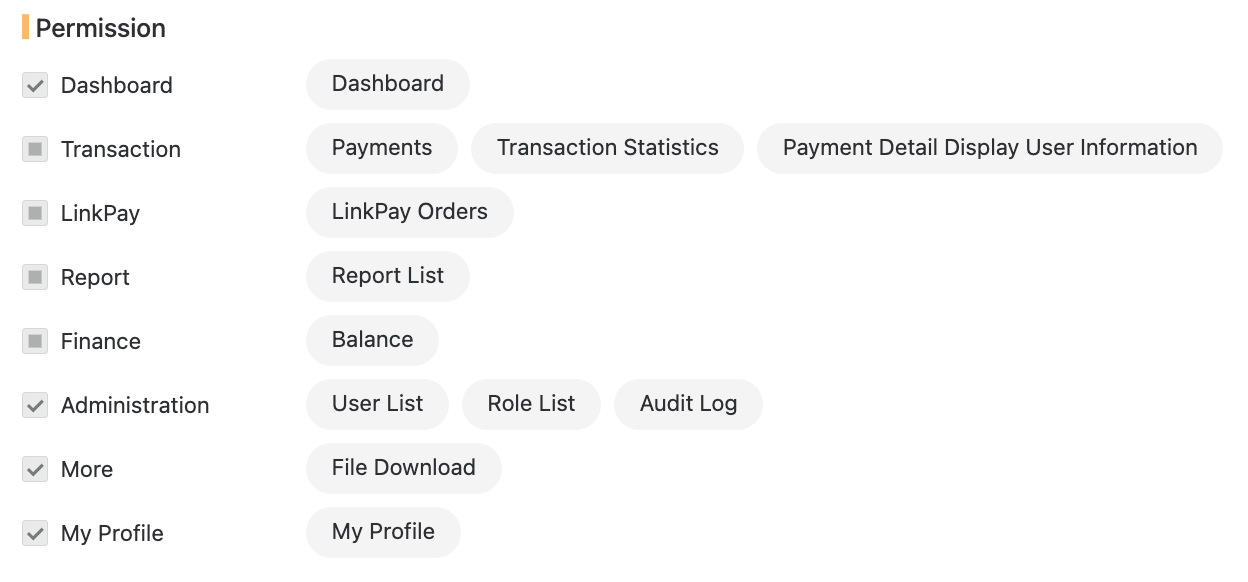
Below is a screenshot showing the Admin role permissions. Merchants can adjust permissions based on their internal structure.
If you have any questions, please contact Evonet Support.
Updated about 1 year ago
Did this page help you?